

Provisioning Azure infrastructure for a web app is easy to get working once.
Getting it repeatable, secure, and boring across environments is where things get interesting.
I wanted a pattern that:
- uses managed identity instead of secrets
- relies on RBAC, not connection strings
- captures auth failures in logs
- runs entirely through CI/CD
- is safe to destroy
- can be reused for future apps
This post walks through the Terraform + Azure DevOps pattern I ended up with.
No magic. Just lessons learned the hard way.
The Problem
Most Azure app setups I see eventually drift into:
- secrets in pipelines
- storage keys in app settings
- inconsistent RBAC
- missing diagnostics
- “just click it in the portal” fixes
It works… until it doesn’t.
I wanted a baseline where:
- If something fails, logs tell me why.
- If something changes, Terraform did it.
- If someone needs access, RBAC handles it.
Architecture Overview
Here’s the shape of the pattern.
flowchart TD DevOps[Azure DevOps Pipeline] TFC[Terraform Cloud] Azure[(Azure Subscription)] DevOps -->|Plan/Apply| TFC TFC --> Azure subgraph Azure RG[Resource Group] ASP[App Service Plan] Web[App Service] MI[Managed Identity] KV[Key Vault] SA[Storage Account] LAW[Log Analytics] Web --> MI MI -->|RBAC| KV MI -->|RBAC| SA KV -->|Audit Logs| LAW SA -->|Blob Logs| LAW Web -->|App Logs| LAW end
Key ideas:
- App Service uses system-assigned managed identity
- Identity gets RBAC to Key Vault + Storage
- Diagnostics go to Log Analytics
- Terraform Cloud runs Terraform
- Azure DevOps orchestrates
Terraform Cloud Private Registry (Core of the Pattern)
One of the most important pieces of this setup is not in the root repo.
All reusable infrastructure modules are published to your Terraform Cloud private registry.
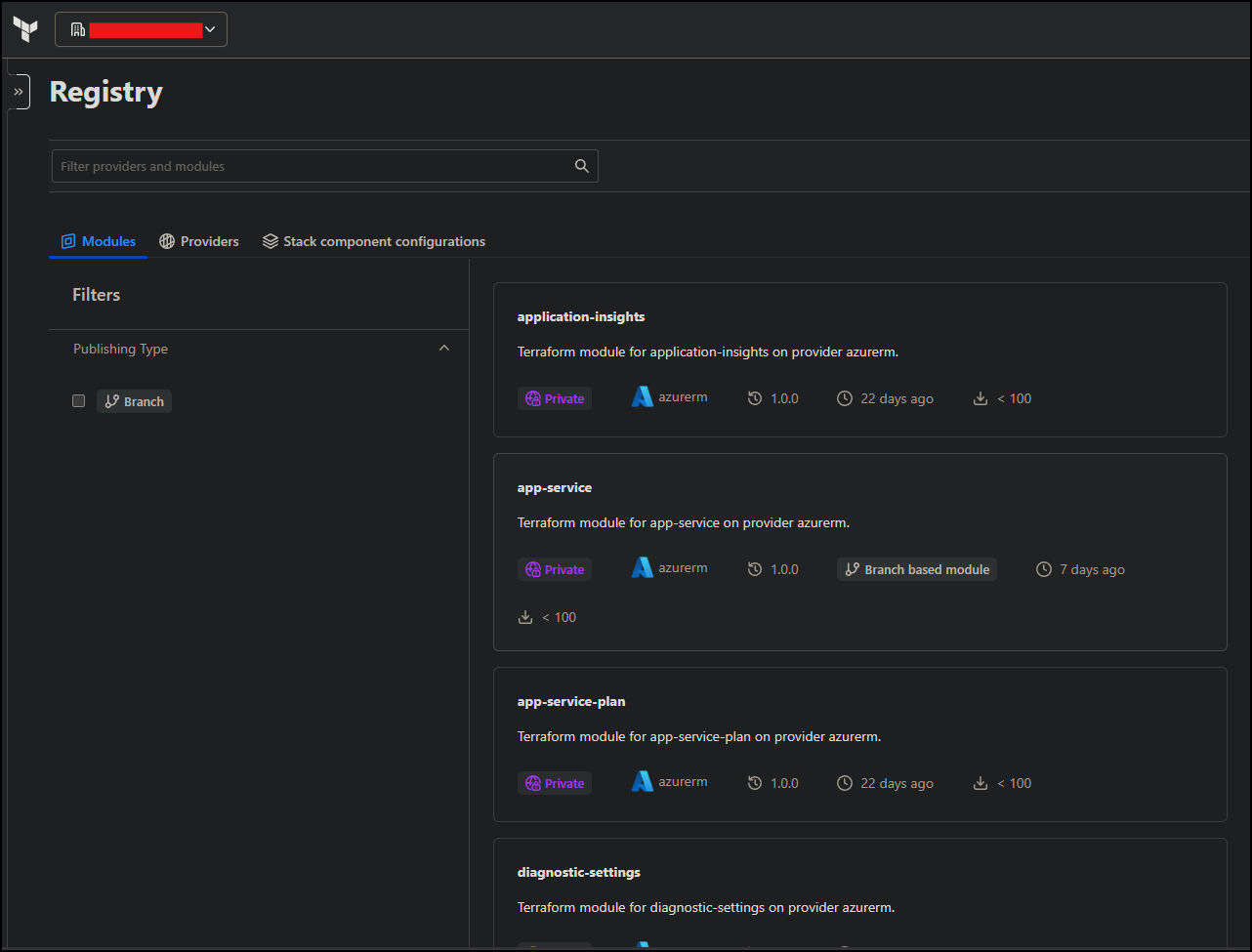
That includes modules for:
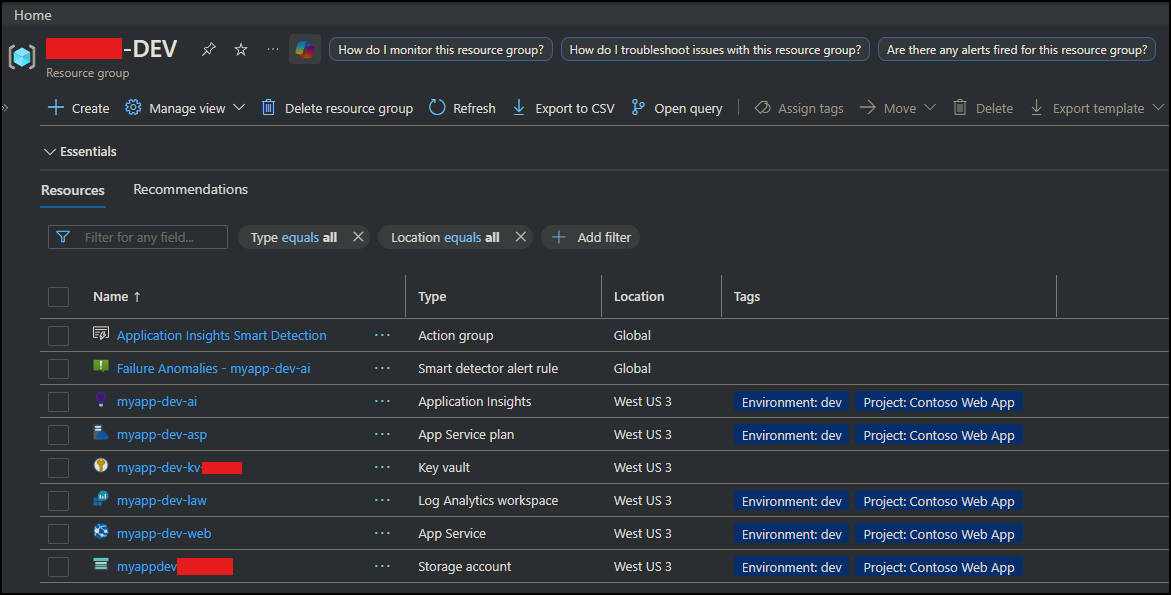
- resource group
- log analytics
- app service
- key vault
- storage account
- diagnostics
The root repo main.tf does not define resources directly. It orchestrates modules from the registry.
Root module example
module “app_service” {
source = “app.terraform.io/org/app-service/azurerm”
version = “1.0.0”
name = local.app_name
resource_group_name = module.resource_group.name
location = var.location
}
module “key_vault” {
source = “app.terraform.io/org/key-vault/azurerm”
version = “1.0.0”
}
This separation gives a few big advantages:
- Modules are versioned and reusable
- Multiple apps share the same baseline
- Root repos stay small and focused
- Platform changes can be rolled out centrally
In short:
- Terraform Cloud registry acts as the platform layer
- Root repo acts as the environment layer
Design Principles
This pattern follows a few rules:
- No secrets stored in Terraform
- Managed identity everywhere
- RBAC over access keys
- Terraform Cloud for state + modules
- Azure DevOps for approvals
- Diagnostics enabled by default
- Destroy requires manual approval
If it can drift, it eventually will — so lock it down early.
Terraform Structure
terraform/
- main.tf
- rbac.tf
- diagnostics.tf
- app_service_custom_domain.tf
Modules live in the Terraform Cloud registry.
Root handles:
- wiring modules together
- RBAC
- diagnostics
- environment configuration
That keeps modules reusable and boring.
Managed Identity + RBAC
The App Service gets a system-assigned managed identity.
That identity receives:
- Key Vault Secrets User
- Storage Blob Data Contributor
Terraform example
resource “azurerm_role_assignment” “app_kv_access” {
scope = module.key_vault.id
role_definition_name = “Key Vault Secrets User”
principal_id = module.app_service.principal_id
}
No secrets. No keys. No rotation headaches.
Diagnostics for Access Failures
RBAC systems fail with authorization errors.
So diagnostics are critical.
Key Vault
log_categories = [“AuditEvent”]
Storage blob service
locals {
blob_service_id = “${module.storage_account.id}/blobServices/default”
}
log_categories = [
“StorageRead”,
“StorageWrite”,
“StorageDelete”
]
⚠️ Azure storage logs live on the blob service, not the account root.
Querying failures
Once deployed, this query shows Key Vault denials:
AzureDiagnostics
| where ResourceProvider == “MICROSOFT.KEYVAULT”
| where ResultType == “Denied”
| project TimeGenerated, OperationName, Identity
Storage failures:
AzureDiagnostics
| where ResourceProvider == “MICROSOFT.STORAGE”
| where ResultType == “AuthorizationFailure”
If RBAC breaks, you’ll know exactly why.
Pipeline Workflow
Azure DevOps pipeline stages:
- Validate
- Plan
- Apply (approval required)
- Destroy (manual + approval)
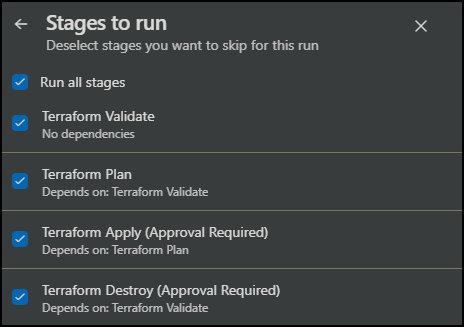
📝 Destroy is gated with a pipeline parameter.
parameters:
- name: runDestroy
type: boolean
default: false
You have to opt-in to destruction.
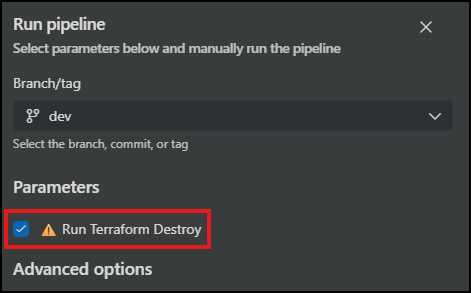
Because we’ve all deleted the wrong thing once.
Hooray! 🍻
Lessons Learned
A few surprises:
- Storage diagnostics must target
blobServices/default - Managed identity IDs are only known after apply
- RBAC propagation takes ~60 seconds
- Terraform module shape matters (object vs map vs list)
- Diagnostics save hours of debugging
Why This Pattern Works
This setup gives you:
- reusable Terraform modules via Terraform Cloud registry
- centralized identity model
- consistent RBAC
- full diagnostics
- safe deployment pipeline
- repeatable environments
It’s not flashy.
It’s reliable.
And that’s the point.
Where This Goes Next
This pattern is now my baseline for new apps.
Future improvements could include:
- alerts on auth failures
- policy enforcement
- template repo for teams
- private endpoints
- zero-trust networking
But even without those, this is a solid foundation.
Closing Thoughts
Terraform makes infrastructure reproducible.
RBAC makes it secure.
Diagnostics make it debuggable.
Pipelines make it safe.
Add a private module registry and you get something teams can actually reuse.
If you’re building Azure web app infrastructure repeatedly,
this pattern is a solid place to start.
The full implementation is available here.
Please feel free to drop a line in the comments for any questions or suggestions on how you may be doing this better.
Hope this helps!
 Churchill's Blog