

Welcome to the last post for 2023 (123123). I was recently presented with an interesting challenge by one of our application development teams and thought this would make a good addition. There is a customer portal application running in Azure that makes use of configuration files (*.JSON and *.XML) to provide custom experiences based on the client interacting with the service. The ask of us was to take these files frequently updated by the developers and upload them to Azure storage using an automated process.
Here’s how we did just that. 🙂 The code used can be seen here.
Let’s look at each of the pieces needed for this to work. Ready to dive in?
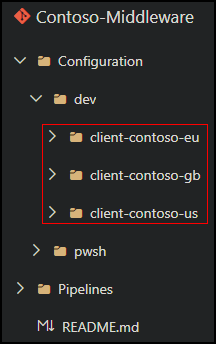
Here’s the repo structure where each client is separated by environment (DEV, QA, etc.).

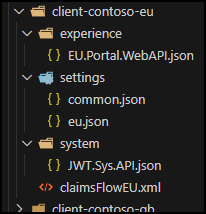
These are the various client configuration files to upload to Azure storage.
Here’s the YAML and PowerShell files.

We need to generate a shared access signature key (SAS) that will be used by the pipeline to access the storage account. A shared access signature (SAS) is a URI that grants restricted access rights to Azure Storage resources. You can define options such as permissions, resource type, allowed protocol and a time to live (TTL) which is always recommended for security purposes. More information can be found here.

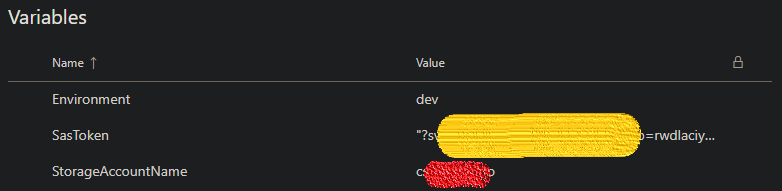
In Azure DevOps, create a new variable group as follows. This will be used by the pipeline during execution. Be sure to enclose the SasToken value in double quotes (” “) and click the padlock icon to obscure the value for an extra layer of security.
Create a new pipeline and select the YAML file.

The script compares its list of clients ($clientList) with that of the repo ($folderList). If there is a match between the two, the storage account container is created if it doesn’t exist. Make sure the client list is updated accordingly to match.

Let’s run the pipeline. As previously mentioned, the script will check the storage account and create any containers determined to be missing. Next, content from the repo is copied up.

If the container already exists, the script will simply copy repo data to the storage account and move on to the next item in the client list array.

I love these kinds of challenges thrown my way! If you have any questions or suggestions on how to improve things, please do reach out in the comments. For example, I’m planning on revisiting this later to see if ADO pipeline service connections can be used to access storage accounts instead of shared access signatures to make things easier to manage.
Have a safe happy New Year!
 Churchill's Blog